HOW TO PLAY LOOPRACE
How to play
Draw your own circuits, then race them together in a 3D series. This guide covers the flow and controls on desktop and mobile.
1. Open a lobby and get ready
Choose a driver name and car. Open a public lobby, or make it private so friends can join only with a code or invitation link. A lobby holds two to eight drivers; the host can add up to seven bots.
The host selects the map size and bot difficulty: Easy keeps the original driving planner, Medium corners faster, and Hard uses racing lines with quicker item reactions. Human players ready up before each new series. Bots are ready automatically. A second local player is supported on desktop; this option is unavailable on mobile.
2. Draw and confirm a circuit
Draw the road's centre line with the mouse held down or using touch, and return the end to the start. Track validation explains short or open circuits with an error message. The road follows the map edge when you reach it. The square map keeps its proportions even in wide windows.
Confirm your track first. The tools for items, hazards and scenery then appear. There is no editor test drive: submit your design directly after decorating it.
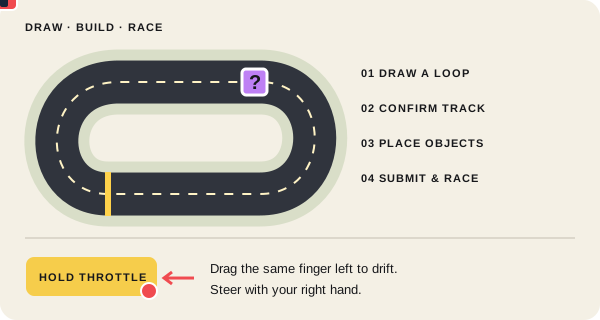
3. Place items, obstacles and scenery
Place objects individually or use automatic placement after confirming the track. It adds item boxes, boosts, water, obstacles and matching scenery. Existing objects stay in place; Undo removes the additions.
Drag selected objects into position. A rotation handle, angle slider, mouse wheel and R make alignment easier. Scenery shapes the surroundings. Water can extend beyond the road without preventing an otherwise valid circuit from being submitted.
- Leave a safe line around water and barriers.
- Place boosts on sections with a clear view.
- Space item boxes out so drivers have time to react.
4. Desktop controls
Steer with WASD or the arrow keys. S or the down arrow brakes, then reverses. Hold Space to drift. Steering into the turn tightens the drift; countersteering widens it. Releasing drift can trigger a charged mini-turbo.
Shift or E uses your item. R resets you to the last valid checkpoint. C switches cameras. Hold a mouse button in the race view and drag to look around; releasing returns the view forward. The bumper camera keeps its fixed position and field of view. In local split-screen, player 1 uses WASD and Space, while player 2 uses the arrow keys and Enter.
5. Mobile controls
Turn your phone to landscape. Throttle is on the left and steering buttons are on the right. Hold throttle and drag the same finger left or right to drift. Steer with your right hand to tighten or widen the turn. Slide the throttle finger back to end the drift; lifting it ends both throttle and drift.
Brake/reverse, item and reset have separate controls. When you start or tap, the game tries to enter browser fullscreen and switch to landscape. You can also use the Fullscreen button. If your browser does not support this, add LoopRace to your Home Screen through the browser menu and launch it there.
6. Racing, checkpoints and items
All drivers load their race view before the shared countdown starts. Each submitted track is raced for three laps. Checkpoints must be passed in order; shortcuts do not count.
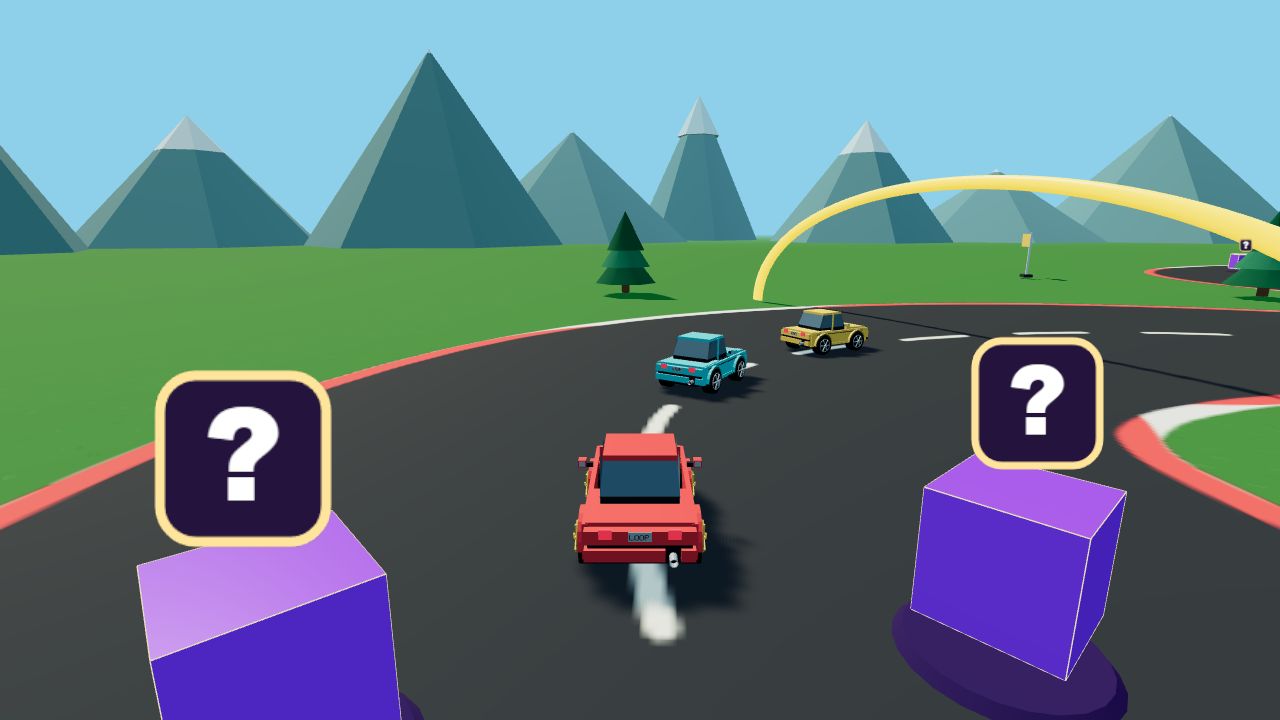
Yellow arches mark the next checkpoint. A short coin sound confirms passing it. Grass slows you down, water resets you and barriers cost speed. Vehicle-to-vehicle collisions are currently disabled.
Item boxes grant seven items: Turbo and Super Turbo boost your speed, Slime drops a trap, Shield protects you for five seconds, and Pulse slows nearby opponents. Jammer targets the nearest driver in a narrow area ahead; shields block it. The Recovery Kit removes impairment and protects you for two seconds. Bots use the same items. Resetting helps if you get stuck without skipping checkpoints.
7. Results, coins and the next series
Points appear between races and the next track starts automatically. The results table shows race times. At the end you also see the total coins earned in the series. Return to the lobby for the next series, where everyone must get ready again.
LoopCoins are awarded for confirmed race results. There is no daily limit. Solo and bot races pay less than races with several human players. Incomplete or invalid results may receive no reward.
8. Customise your car
Open the tuning workshop, preview parts on your 3D car and confirm purchases at the individual part. Unpurchased parts are listed before you finish. Tuning changes appearance only, never performance.
Your coin guest account belongs to this browser. Keep the guest cookie to retain access to coins and unlocked parts. Sign-in and automatic transfers to other devices are not currently available.